

Quick summary
Funnel Recovery is a Piwik PRO Analytics feature that brings back visitors who drop off a tracked path like an application, booking or form. It shows them a simple on-site banner and runs on the consent rules and Analytics setup your compliance team already approved, so there’s no new tool or data flow to sign off.
What this guide covers: what Funnel Recovery is, how it works, how consent applies and how to measure it.
Who it’s for: marketers, analytics leads and CRO teams in regulated industries like banking, insurance, healthcare and the public sector.
Funnel Recovery helps you re-engage visitors who drop off a tracked path, like an application, a booking, or a form. It uses a simple on-site banner, and it runs inside the same Analytics setup your compliance team already reviewed and approved.
If you market for a bank, an insurer, a hospital system, or a public sector agency, you know the drill: a new marketing capability has to pass legal, compliance, or IT security first. Only then does anyone get to ask how well it converts. That review usually decides whether something makes it onto the site at all.
That’s exactly why Funnel Recovery is worth a look. It doesn’t ask you to sponsor a new tool or defend a new data flow, it just puts an existing, approved system to fuller use, and helps you bring visitors back with far less friction than a bigger project would.
Jump to section:
- What is Funnel Recovery in Piwik PRO?
- Why do visitors drop off on website paths?
- How does Funnel Recovery actually work?
- What if a user path is longer than one visit?
- Does Funnel Recovery require new consent collection?
- How do you measure whether Funnel Recovery is working?
- How does this fit into a broader compliance-and-performance strategy?
- Frequently asked questions
What is Funnel Recovery in Piwik PRO?
In short: a built-in banner that re-engages visitors who drop off a funnel.
Funnel Recovery is a Piwik PRO Analytics feature. It turns a finding from your funnel report into action. Say a visitor starts an application, begins a booking, or opens a form, but doesn’t reach the next step. Funnel Recovery can add that visitor to a recovery audience and show them an on-site banner that invites them back.
It works with data you already collect, using consent rules you’ve already approved.
Why do visitors drop off on website paths?
In short: most people just need more time or more information.
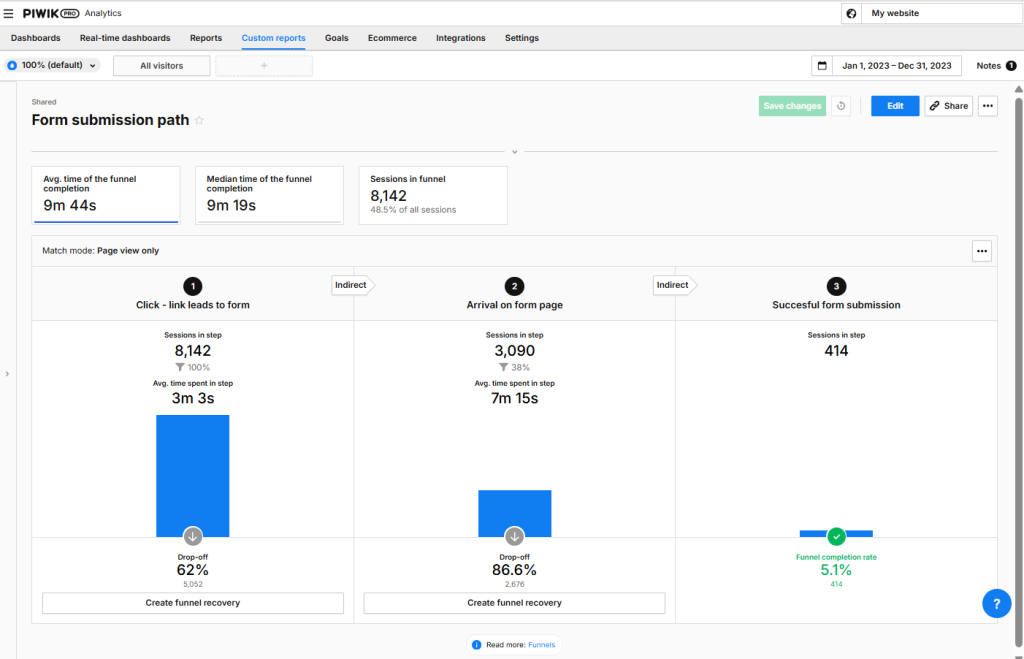
People abandon applications, bookings, and forms for ordinary reasons. They get distracted. They want to compare options. They need to find a document before they can finish. A funnel report shows you exactly where this happens: which step loses people, and how many.
With enough data, teams can use those insights to decide what needs improvement. They can test changes to content, design, forms, navigation, or the overall user flow, and then check whether those changes reduce drop-offs over time.
But that process takes time. You need enough traffic to spot patterns, make changes, run tests, and wait for reliable results. In the meantime, visitors may continue to leave the path and never return.
Funnel Recovery adds another option. While you work on improving the path itself, you can use a simple on-site banner to gently nudge visitors back to the process they started – either later in the same visit or the next time they return to your website.
How does Funnel Recovery actually work?
In short: a funnel report becomes an audience, and a delay becomes a reminder.
Funnel recovery starts with a funnel report. Once you identify a drop-off point in a tracked path, you can use it to create an audience of visitors who reached one step but did not continue to the next one.
You then decide when the recovery message should appear. The delay gives visitors time to continue on their own before they are shown a reminder. Depending on the setup, the banner can appear later in the same visit or during a future visit within the configured recovery window.
The message itself is a simple on-site banner. It can remind visitors about the process they started and link them back to the relevant page or next step. You can adjust the title, message, button text, destination URL, and basic appearance, so the banner feels aligned with your website without requiring extensive design or development work.
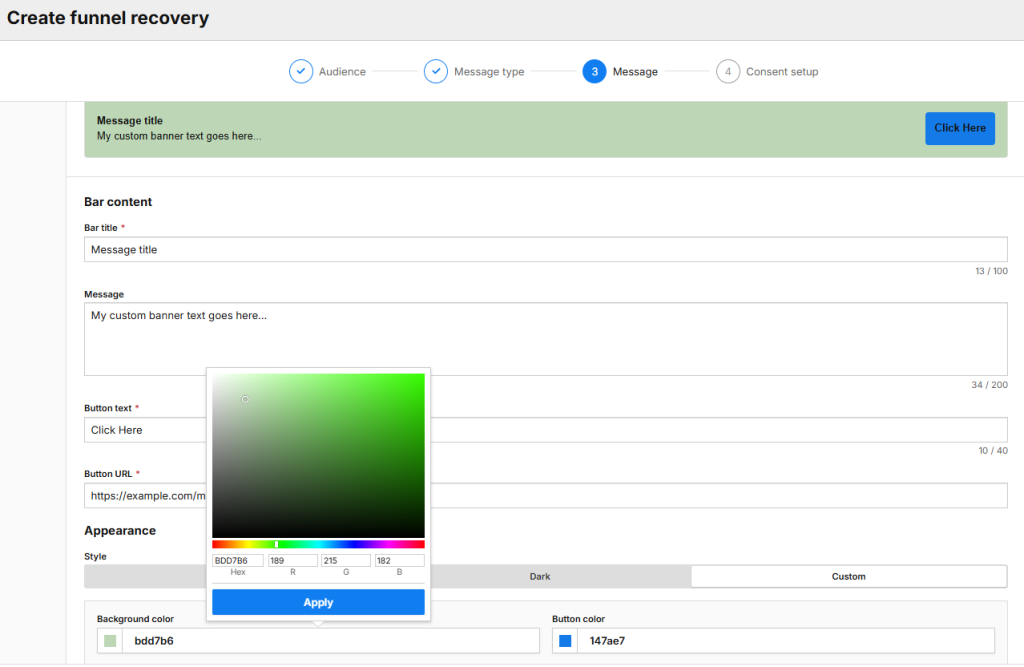
This gives teams a quick way to act on funnel report data without waiting for larger UX or content changes to be planned, tested, and implemented.
What if a user path is longer than one visit?
In short: yes – you can extend the recovery window in Data Activation.
Some paths may also stretch beyond a single visit. A visitor might start a process, leave to gather information, and return later to continue. In those cases, the audience created through Funnel recovery can be adjusted further in Data Activation, for example by extending the time allowed between steps.
Teams can also refine the audience with additional conditions available in Data Activation, such as user attributes and event dimensions. This can include custom attributes based on data synced from external systems, such as a CRM. As a result, Funnel Recovery can support not only simple one-session paths, but also more considered journeys where visitors may need more time before taking the next step.
Funnel recovery – a step-by-step guide
Here’s the full flow, from spotting the drop-off to scaling the recovery action.
| Step | What happens |
|---|---|
| 1. Find the drop-off | Use an existing funnel report to see where visitors stop between one step and the next. |
| 2. Set a delay | Decide how long to wait before sending a reminder – later in the same visit, or on a future visit. |
| 3. Build the banner | Set the title, message, button text, destination URL, and basic look to match your site. |
| 4. Extend it if needed | For processes that span more than one visit, adjust the audience in Data Activation: extend the time between steps, or add conditions based on user attributes or CRM data. |
| 5. Scale it further | Send the same audience into other data activation tools, like custom content tags, if a banner isn’t enough on its own. |
The Funnel Recovery banner is intentionally lightweight. It gives visitors a clear prompt, a call-to-action, and a link back to the process they started. You can adjust the message and basic appearance so it fits your website, without needing a larger design or development project.
For many teams, that is enough to start acting on drop-offs quickly. If you need a more advanced setup, you can build on the same audience in Data Activation and use other activation methods, such as custom content tags or additional channels, depending on your configuration. Funnel recovery gives you the fastest route to launch, while leaving room for more tailored experiences when needed.
“When you connect with users who’ve already shown interest, you’re not just increasing your chances of conversion – you’re creating a more personalized experience that resonates. It’s about staying top of mind and making it easy for them to take the next step.”

Product Evangelist at Piwik PRO
Does Funnel Recovery require new consent collection?
In short: no. It runs on the consent rules you already have.
Funnel Recovery works from visitor profiles built on your Analytics data, so your existing consent settings apply automatically.
- If consent collection is on for your site, a profile is only created and used for personalization after the visitor gives analytics consent.
- If consent collection is off, for example because your setup doesn’t legally require a consent banner, profiles can be created without that extra step.
- You can add another layer of consent before the recovery banner appears, for things like A/B testing, marketing automation, or remarketing, based on your own policy.
This gives privacy-conscious organizations control over how recovery is handled. They can use Funnel Recovery to support task completion while aligning the activation logic with their consent strategy and internal data-use rules.
How do you measure whether Funnel Recovery is working?
In short: check the same funnel report that flagged the drop-off.
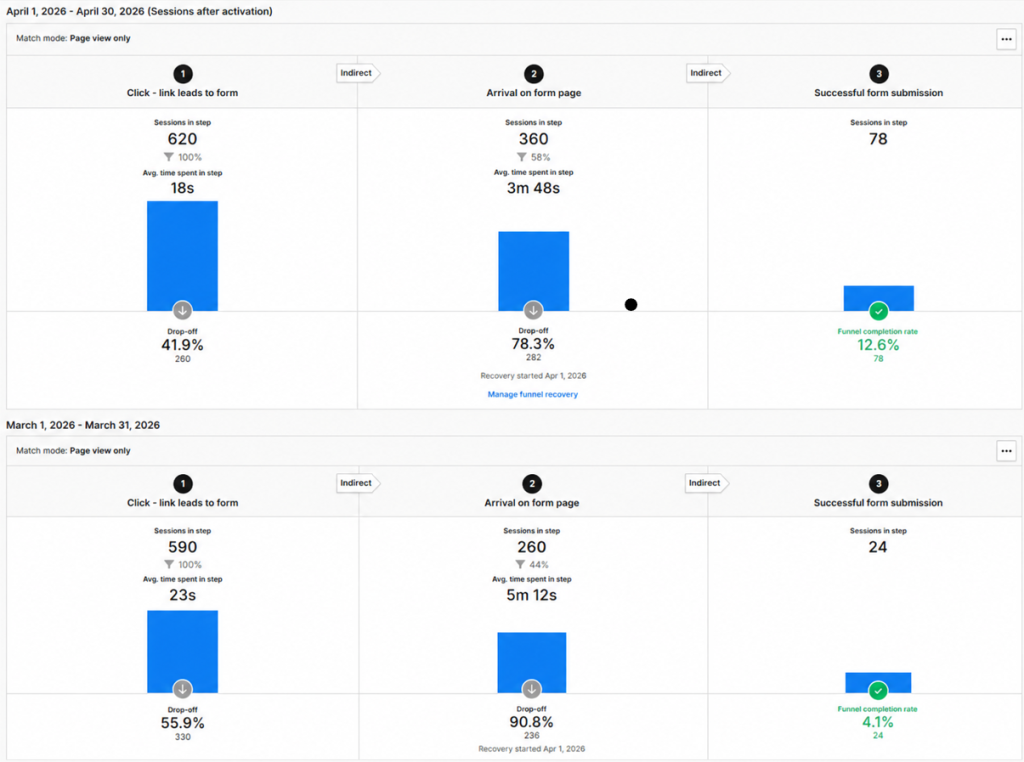
Funnel recovery should be measured in the same context in which it starts: the funnel report. After launching a recovery banner, teams can check whether more visitors continue through the path and complete the intended action.
The first signal is engagement with the banner itself. You can see whether the message was shown, clicked, or dismissed. This helps you understand whether visitors noticed the prompt and whether the call-to-action was relevant enough to bring them back.
The more important question is whether the path performs better after recovery is introduced. Teams can compare completion rates before and after launching the banner, and use the results to decide whether the message, timing, or audience definition should be adjusted.
In this way, funnel recovery becomes part of the same optimization loop as funnel analysis: identify where users leave, act on the drop-off, measure what changed, and keep improving the path.
SUCCESS STORY
“We improved our ability to communicate with customers in a privacy-compliant and targeted manner. The platform helped us optimize processes, better understand needs, and personalize interactions – all of which enhanced service delivery and boosted satisfaction.”

Susanne Dreier-Phan Quoc
Digital Customer Insights Manager at Wien Energie
How does this fit into a broader compliance-and-performance strategy?
In short: it turns a funnel-report finding into action and keeps the whole loop inside Analytics.
Not every visitor who leaves a key path is lost. Some need more time, more context, or a simple reminder to continue what they started.
Funnel recovery gives teams a practical way to act on those moments. It connects funnel report insights with a lightweight recovery action, helping you bring visitors back to applications, registrations, bookings, forms, and other important website paths.
One of its biggest advantages is that it works directly from within Analytics. Teams can move from identifying a drop-off to setting up a recovery action without needing technical knowledge, custom development, or a separate implementation project.
“Retargeting users who showed intent but didn’t complete their purchases is a game-changer. By delivering tailored offers, you not only recover lost sales but also reduce cart abandonment and foster customer loyalty. Strategic incentives turn missed opportunities into measurable gains, enhancing both revenue and the user experience.”
Product Evangelist at Piwik PRO
For privacy-conscious organizations, this makes recovery more controlled and easier to govern. You can decide when messages appear, which audiences are eligible, and how consent requirements should apply. Because the setup is available directly within Analytics, teams can move from identifying a drop-off to launching a recovery action without relying on additional tools, integrations, or technical implementation work.
The result is a simple loop: identify where users drop off, nudge the right visitors back, measure what changed, and keep improving the path.
See where visitors drop off – and bring them back
Whether you’re already on Piwik PRO or evaluating analytics platforms, Funnel Recovery shows how consent-safe re-engagement can work for regulated industries.
Frequently asked questions
Does Funnel Recovery work if my funnel spans more than one visit?
Yes. For processes that reasonably take longer than one session, you can extend the recovery audience in Data Activation: adjust the time allowed between steps, or add conditions from CRM-synced attributes.
Will visitors see the banner if they haven’t given analytics consent?
Only if consent collection is off for your site, or not legally required for your setup. If consent collection is on, a profile is only created and used for personalization after the visitor gives analytics consent.
Can I require extra consent before the recovery banner shows, beyond standard analytics consent?
Yes. You can set up an added consent requirement for A/B testing, marketing automation, or remarketing, based on your own policy.
Does Funnel Recovery replace the need to fix the underlying page or form?
No, and it isn’t meant to. It recovers conversions while that bigger fix gets planned, tested, and shipped.