


How to use AI to analyze data: A practical guide to MCP servers

What you’ll learn in this guide: Analytics platforms are powerful – but often getting answers out of them still takes more time and expertise than most teams have to spare. This guide explains how MCP (model context protocol) changes that: what it is, how it works with your existing analytics setup, and what it actually looks like in practice. You’ll find plain-language explanations, real use cases, and a walkthrough of how to get started with MCP Beta on Piwik PRO – including what to think about before rolling it out to your team.
Chapter 1
What is an MCP server, and how does it work with analytics?
Chapters
- What is an MCP server, and how does it work with analytics?
- Key advantages of working with MCP
- How to use AI to analyze data: MCP use cases
- Analyze channel performance report
- Perform blog content audit for organic search
- Dive into cross-platform campaign performance
- Create stakeholder dashboards on demand
- Scale analytics setup across multiple websites
- Scale tracking implementation across multiple properties
- Audit and maintain tracking setups
- How to make sure MCP keeps your analytics data safe and private
- How to get started with MCP on Piwik PRO
Most marketing teams aren’t short on data – they’re short on time to make sense of it. Even with the most user-friendly analytics platforms, getting to the right answer takes time. Reports are spread across different sections, metrics need context to mean anything, and knowing where to look is itself a skill.
AI is starting to shift that balance by removing the friction between a question and its answer. The technology that makes this possible is called MCP – and this guide walks you through what it is, how it works, and how to put it to use.
What is MPC?
MCP stands for model context protocol. The name sounds technical, but the idea is simple.
AI tools like ChatGPT, Claude, or similar assistants are good at reasoning and language – they can write, summarize, explain, and analyze. But on their own, they can’t see your analytics data and tell you which campaigns are actually converting.
An MCP server is the bridge that connects an AI tool to an external platform – your analytics software, your tag manager, your CRM – so the AI can read data from it, and in some cases take actions within it.
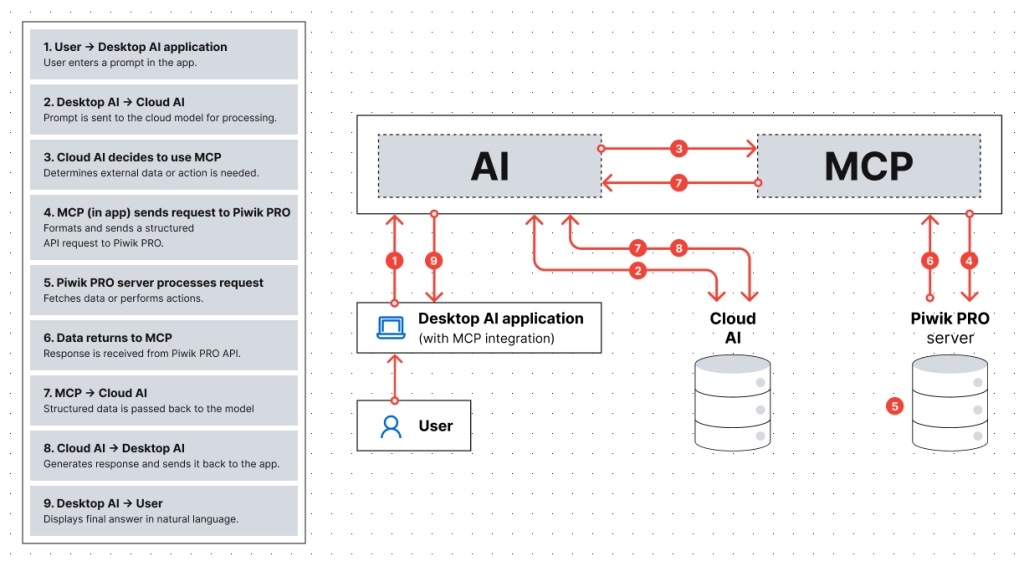
Once that connection is set up, you can type a question in plain language and get back real data from your platform, without navigating menus, building reports, or exporting CSVs.
Think of it like asking your analytics platform a question the way you’d ask a colleague: “How did our paid campaigns perform last month, broken down by channel?” – and it just answered. That’s what MCP does.
What MCP does exactly
With MCP, your analytics data becomes accessible through natural language. Instead of navigating different areas of the interface, you can directly request what you need and have it executed.
- Data analysis. Ask for specific metrics – sessions, conversions, bounce rate – apply filters, segments, and date ranges, then ask follow-up questions to dig deeper. Less experienced users can get answers quickly. Advanced users can explore without rebuilding reports step by step.
- Data integration. MCP lets you combine analytics data with external sources. You can pull your data and analyze it together with uploaded files like CSVs, enriching insights across datasets in a single workflow.
- Analytics implementation and configuration. Goals, custom dimensions, tags, triggers, and variables can be created or updated by describing what should be tracked – across multiple properties at once. This speeds up repetitive work and helps ensure consistency, from defining what to measure to implementing it.
Chapter 2
Key advantages of working with MCP
Chapters
- What is an MCP server, and how does it work with analytics?
- Key advantages of working with MCP
- How to use AI to analyze data: MCP use cases
- Analyze channel performance report
- Perform blog content audit for organic search
- Dive into cross-platform campaign performance
- Create stakeholder dashboards on demand
- Scale analytics setup across multiple websites
- Scale tracking implementation across multiple properties
- Audit and maintain tracking setups
- How to make sure MCP keeps your analytics data safe and private
- How to get started with MCP on Piwik PRO
Before getting into who benefits and how, it helps to understand the underlying advantages that make MCP useful across different roles and use cases:
- Accessibility. MCP shifts part of the interaction from navigating the interface to describing what you want. New users don’t need to know exactly where things are. Experienced users get a faster way to execute complex or repetitive tasks. Either way, the focus moves to outcomes.
- Scalability. Tasks that would normally require repeating the same steps across multiple properties – creating setups, updating configurations, auditing implementations – can be handled in a single prompt. Work that used to take hours or days, especially in multi-site or agency environments, gets done in a few structured requests.
- Flexibility. MCP connects data access, implementation, and external data handling into one workflow. You can move from asking a question, to retrieving data, to adjusting a setup or combining datasets – without switching tools or context. This is especially valuable when analysis and implementation need to happen together.
Does MCP replace your existing analytics platform?
No. MCP sits on top of it. Your data, permissions, and privacy settings stay exactly as they are. What changes is how you interact with all of that – through natural language, inside your AI tool.
Who benefits most from using MCP with an analytics platform?
- Marketing managers and generalists. Getting data today usually means asking someone else, waiting, and getting a report that half-answers the question. With MCP, you get the answer directly – without learning the platform or waiting in someone’s queue.
What changes: less waiting for someone to pull a report. More time acting on what it says. - Performance marketers and PPC specialists. Your data lives in at least two places: the ad platform and your analytics tool. MCP lets you combine those sources in one prompt, calculate metrics like cost per conversion or ROAS, and move faster on campaign decisions.
What changes: less time building the view. More time using it. - Data analysts and content/SEO specialists. You already know what you want to find – but getting there means building a report, exporting it, pivoting, rebuilding. MCP fits the way you actually work: dig, follow up, go deeper, try a different angle – through a sequence of prompts, with derived metrics your platform doesn’t natively calculate, without switching between tools.
What changes: less time navigating. More time analyzing. - Agencies managing multiple client accounts. The same reports, the same setups, the same configurations – rebuilt for every client, every month. MCP lets you run queries across multiple properties, standardize processes, and produce client-ready outputs without starting from scratch each time. One practical note: working across multiple analytics instances may require separate credentials per instance.
What changes: fewer hours on repeatable work. More capacity for the analysis that actually requires your judgment. - Enterprise teams with many websites and apps. When you manage dozens of properties, every change – a privacy setting, a tracking update, a configuration audit – has to happen across all of them. MCP lets you apply settings, run audits, and update configurations through prompts rather than logging into each property manually.
What changes: setup and maintenance that used to take hours or days gets handled in a single workflow.
“AI opens up opportunities every organization should explore. After working with Piwik PRO MCP for months, I see it as an enhancer: it helps newcomers do more with data and senior professionals move faster.
Piwik PRO MCP supports both data work and implementation — from fetching dashboards and creating slide-ready insights to setting up data collection, adding tags, and scaling the setup.
Does that make the UI obsolete? Definitely not. Clicking is still faster in many cases. MCP simply removes friction, especially around repetitive work.”

Michał Idziak
Product Evangelist, Piwik PRO
Chapter 3: MCP USE CASES
How to use AI to analyze data: MCP use cases
Chapters
- What is an MCP server, and how does it work with analytics?
- Key advantages of working with MCP
- How to use AI to analyze data: MCP use cases
- Analyze channel performance report
- Perform blog content audit for organic search
- Dive into cross-platform campaign performance
- Create stakeholder dashboards on demand
- Scale analytics setup across multiple websites
- Scale tracking implementation across multiple properties
- Audit and maintain tracking setups
- How to make sure MCP keeps your analytics data safe and private
- How to get started with MCP on Piwik PRO
The ways you can use MCP in your marketing and analytics work are almost limitless – from pulling a quick report to managing tracking setups across dozens of properties.
For simpler tasks, MCP makes it easier to get answers without needing to know how reports are structured or what specific metrics are called. You can ask “What drove the increase in conversions last week?” or “Which channels had the highest bounce rate this month?” and get a direct response – no manual report building required.
For more advanced workflows, you can build on retrieved data using follow-up prompts. Instead of stopping at one answer, keep exploring: “Break this down by device”, “Compare it to the previous period”, “Show only new users from organic traffic.”
The examples below focus on the tasks that come up most often: the ones that take too long, happen too frequently, or require more platform knowledge than most teams have on hand. We’re drawing on Piwik PRO throughout – a privacy-focused analytics platform with MCP support that we know firsthand because we built it.
Want to see Piwik PRO MCP helps you get faster and better insights from your data?
Chapter 4: MCP USE CASES
Analyze channel performance report

Chapters
- What is an MCP server, and how does it work with analytics?
- Key advantages of working with MCP
- How to use AI to analyze data: MCP use cases
- Analyze channel performance report
- Perform blog content audit for organic search
- Dive into cross-platform campaign performance
- Create stakeholder dashboards on demand
- Scale analytics setup across multiple websites
- Scale tracking implementation across multiple properties
- Audit and maintain tracking setups
- How to make sure MCP keeps your analytics data safe and private
- How to get started with MCP on Piwik PRO
A marketing manager needs an overview of how different channels performed in March versus February, for European traffic only – sessions, engagement, conversions – without manually building a report.
They type:
Show me the report for my website example.com. Use the following columns: Channel, Sessions, Bounce Rate, Conversions. Compare March and February 2023 in the same report so each metric for different months are next to each other (e.g. Sessions (Feb), Sessions (Mar) etc.). Filter: European traffic only.
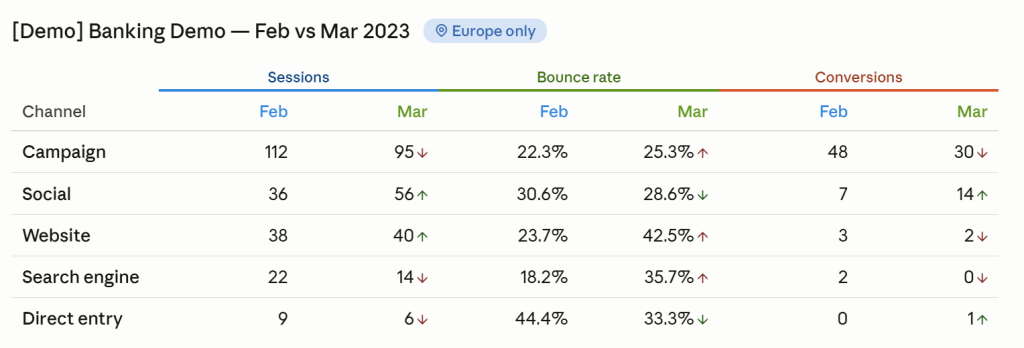
The result is a ready-to-use view. They can keep digging with follow-up questions like “Which channel improved the most month over month?” or “Break this down by country.”
Chapter 5: MCP USE CASES
Perform blog content audit for organic search

Chapters
- What is an MCP server, and how does it work with analytics?
- Key advantages of working with MCP
- How to use AI to analyze data: MCP use cases
- Analyze channel performance report
- Perform blog content audit for organic search
- Dive into cross-platform campaign performance
- Create stakeholder dashboards on demand
- Scale analytics setup across multiple websites
- Scale tracking implementation across multiple properties
- Audit and maintain tracking setups
- How to make sure MCP keeps your analytics data safe and private
- How to get started with MCP on Piwik PRO
A content strategist wants to know which blog posts attract readers who actually engage – not just how many sessions they drive, but whether visitors stay, scroll, and convert.
Instead of pulling traffic, engagement, and conversion data from separate reports:
Fetch me a report for my ‘Banking Website’ showing the top 15 Landing Page URLs by Entries. Include the following columns: Landing Page URL, Entries, Share of Engaged Sessions (% of non-bounced sessions), Engaged Sessions, Average Time on Page, Median Time on Page, Conversion Rate, and Conversions. Filter: channel is campaign or search.
Date range: 2023.
Make sure the report fits the page or add a horizontal scrollbar.
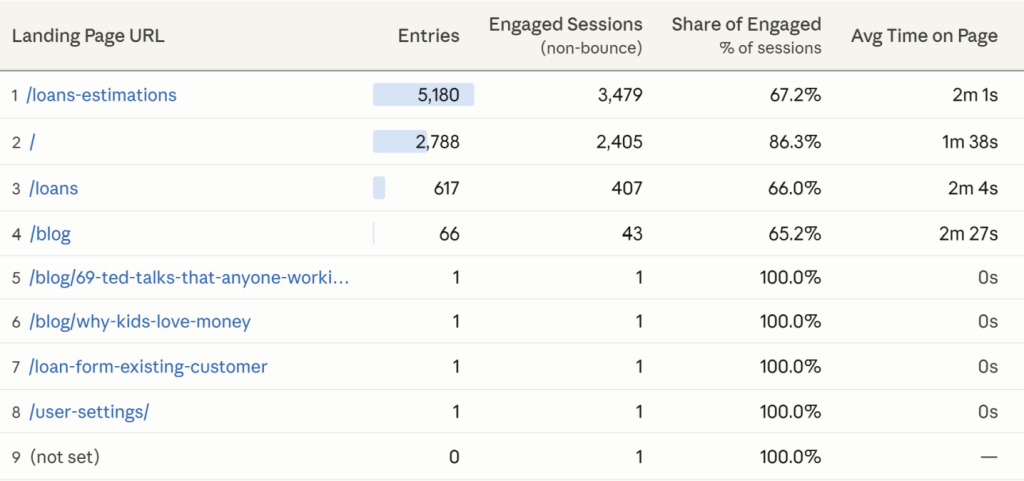
One table. Traffic volume, engagement quality, and scroll behavior per URL. The analysis can go deeper from here: “Which posts have high traffic but low engagement?” or “Which blog pages drove the most conversions from organic search last month?”
Chapter 6: MCP USE CASES
Dive into cross-platform campaign performance

Chapters
- What is an MCP server, and how does it work with analytics?
- Key advantages of working with MCP
- How to use AI to analyze data: MCP use cases
- Analyze channel performance report
- Perform blog content audit for organic search
- Dive into cross-platform campaign performance
- Create stakeholder dashboards on demand
- Scale analytics setup across multiple websites
- Scale tracking implementation across multiple properties
- Audit and maintain tracking setups
- How to make sure MCP keeps your analytics data safe and private
- How to get started with MCP on Piwik PRO
A performance marketer needs a complete picture of CPC campaigns. The problem: post-click data sits in analytics, spend data sits in the ad platform. Reconciling them normally means exporting from both, aligning campaign data, and rebuilding the same report every cycle.
1. Fetch me data for ‘Bank Website’. Use the following columns: Source / Medium, Sessions, Bounce Rate, Conversions. Date range: entire year of 2023. Filter: Source / Medium contains paid or cpc or ppc or display or cpv or banner.
2. I’m adding a CSV with ad spend for given paid campaigns. Merge them by:
source / medium = source_medium
Calculate:
- Cost per session = ad_spend / sessions
- Cost per engaged session = ad_spend / (sessions × (1 – bounce_rate))
- Cost per conversion = ad_spend / conversions
Return:
- a table with the calculated metrics
- short definitions of each metric
2–3 key insights from the results
3. Make sure to display data for both, analytics and ad spend + calculations in one report.
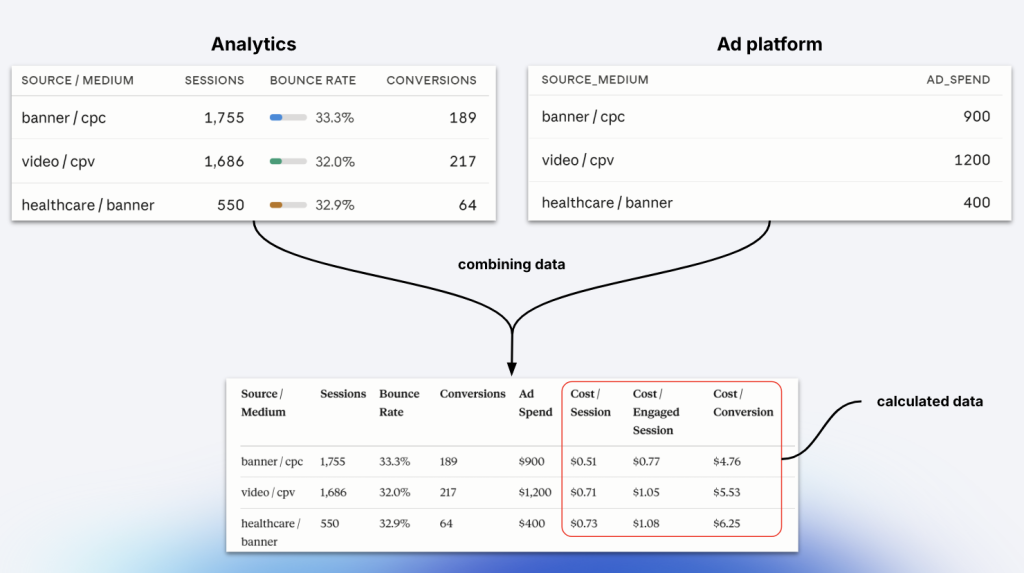
MCP retrieves analytics data directly from Piwik PRO, combines it with the uploaded file, and returns a structured, ready-to-use report. The next questions write themselves: “Which campaigns have spend but no conversions?”, “Show only Google Ads campaigns”, or “What’s the average CPA for top-performing campaigns?”
What makes this valuable is that Piwik PRO provides the ground truth on post-click behavior – data ad platforms don’t capture accurately. MCP brings that together in one step, including calculated metrics like CTR or cost per conversion.
Chapter 7: MCP USE CASES
Create stakeholder dashboards on demand
Chapters
- What is an MCP server, and how does it work with analytics?
- Key advantages of working with MCP
- How to use AI to analyze data: MCP use cases
- Analyze channel performance report
- Perform blog content audit for organic search
- Dive into cross-platform campaign performance
- Create stakeholder dashboards on demand
- Scale analytics setup across multiple websites
- Scale tracking implementation across multiple properties
- Audit and maintain tracking setups
- How to make sure MCP keeps your analytics data safe and private
- How to get started with MCP on Piwik PRO
A marketing manager needs a clear, up-to-date view of key KPIs – without digging through multiple reports. Analytics platforms provide dashboards, but getting something presentation-ready usually takes extra work.
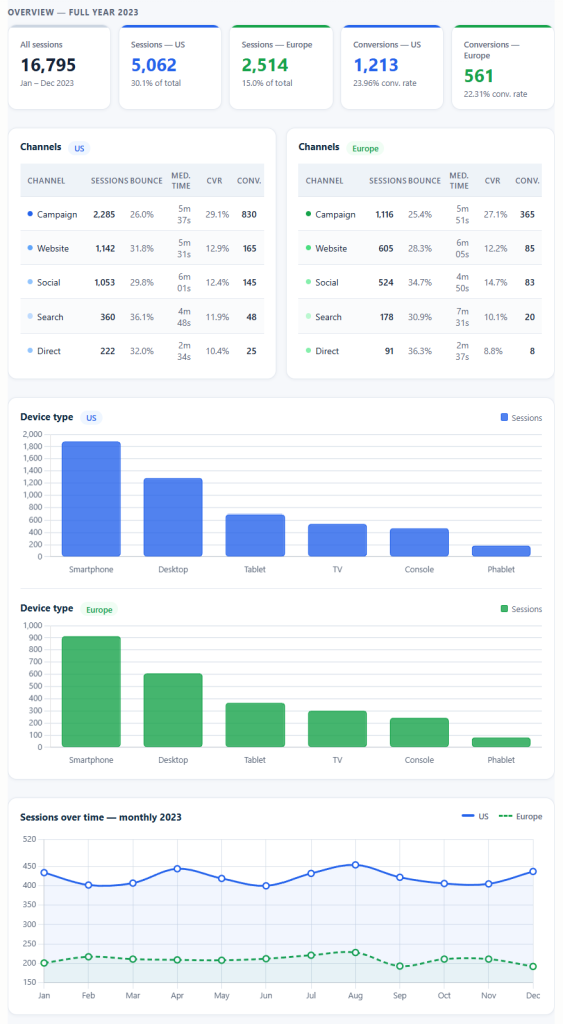
With MCP, they can request exactly what they need:
Why did conversions drop this week? What changed compared to last month? Which channels improved the most month over month?
Rather than rebuilding views or exporting data into slides, they get a dashboard tailored to the timeframe and audience – and can update it with a new prompt. The view stays flexible – refine it with “Add a breakdown by device category” or “Switch this to weekly view” without starting over.
Chapter 8: MCP USE CASES
Scale analytics setup across multiple websites

Chapters
- What is an MCP server, and how does it work with analytics?
- Key advantages of working with MCP
- How to use AI to analyze data: MCP use cases
- Analyze channel performance report
- Perform blog content audit for organic search
- Dive into cross-platform campaign performance
- Create stakeholder dashboards on demand
- Scale analytics setup across multiple websites
- Scale tracking implementation across multiple properties
- Audit and maintain tracking setups
- How to make sure MCP keeps your analytics data safe and private
- How to get started with MCP on Piwik PRO
A team needs to roll out analytics across multiple websites – each requiring its own property, correct configuration, and installation code. Straightforward for one site. Time-consuming and error-prone across many, especially when privacy requirements must be aligned with DPO guidelines.
Using the attached CSV with website domains, create a property for each site. Apply the privacy settings defined in the attached DPO configuration file. Then generate installation codes for each property and export them as a CSV with site name and tracking code.
All properties get created with consistent configurations. Installation codes are structured and ready to pass to developers. No manual copying for each site. The same workflow handles follow-up tasks too: “Update privacy settings across all properties” or “Add a new site with the same configuration.”
Chapter 9: MCP USE CASES
Scale tracking implementation across multiple properties
Chapters
- What is an MCP server, and how does it work with analytics?
- Key advantages of working with MCP
- How to use AI to analyze data: MCP use cases
- Analyze channel performance report
- Perform blog content audit for organic search
- Dive into cross-platform campaign performance
- Create stakeholder dashboards on demand
- Scale analytics setup across multiple websites
- Scale tracking implementation across multiple properties
- Audit and maintain tracking setups
- How to make sure MCP keeps your analytics data safe and private
- How to get started with MCP on Piwik PRO
Once properties are created, the next step is configuring the tracking setup: tags, triggers, variables, goals, and custom dimensions. This work follows a repeatable pattern – but not every setup is identical. Some elements can be reused; others need to be adjusted per site.
Using the attached tracking plan, create the required tags, triggers, variables, conversions, and custom dimensions across these properties. Reuse shared variables where possible, adjust domain-specific rules for each website, and prepare the setup for debugging before publishing.
Instead of configuring each element manually per property, MCP applies a consistent tracking framework while handling site-specific differences. The setup can be published directly or left ready for validation by analytics, development, or QA teams.
Chapter 10: MCP USE CASES
Audit and maintain tracking setups

Chapters
- What is an MCP server, and how does it work with analytics?
- Key advantages of working with MCP
- How to use AI to analyze data: MCP use cases
- Analyze channel performance report
- Perform blog content audit for organic search
- Dive into cross-platform campaign performance
- Create stakeholder dashboards on demand
- Scale analytics setup across multiple websites
- Scale tracking implementation across multiple properties
- Audit and maintain tracking setups
- How to make sure MCP keeps your analytics data safe and private
- How to get started with MCP on Piwik PRO
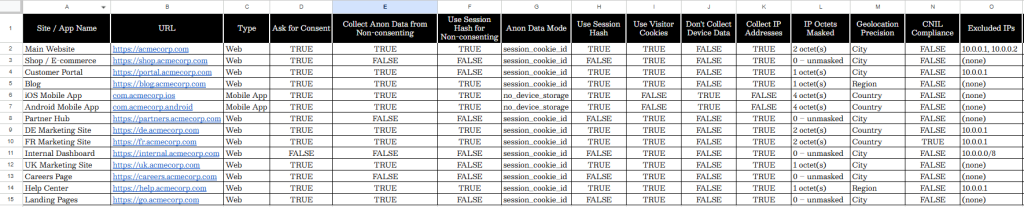
Teams managing multiple websites need to keep track of what’s actually implemented – tags, triggers, variables – especially as setups evolve. Keeping documentation current usually means manually checking each property, which is time-consuming and easy to let slip.
For property XYZ, fetch all tags, triggers, and variables, and export them into a structured CSV.
Instead of navigating each property manually, MCP retrieves the current setup and structures it for documentation or audit workflows. It makes it easier to compare setups across properties, identify inconsistencies, and keep records accurate without repetitive manual checks.
Chapter 11
How to make sure MCP keeps your analytics data safe and private

Chapters
- What is an MCP server, and how does it work with analytics?
- Key advantages of working with MCP
- How to use AI to analyze data: MCP use cases
- Analyze channel performance report
- Perform blog content audit for organic search
- Dive into cross-platform campaign performance
- Create stakeholder dashboards on demand
- Scale analytics setup across multiple websites
- Scale tracking implementation across multiple properties
- Audit and maintain tracking setups
- How to make sure MCP keeps your analytics data safe and private
- How to get started with MCP on Piwik PRO
Connecting an AI tool to your analytics data raises real questions – and they’re worth taking seriously. At Piwik PRO, privacy isn’t a compliance checkbox. We’re an EU-owned platform built for organizations that operate in regulated environments, with data ownership, residency, and governance baked in from day one.
That said, every organization’s situation is different. Before rolling out MCP, review the setup with your legal and security teams – particularly if you handle sensitive data or operate in a regulated industry.
Where are your credentials stored?
When MCP is installed locally, your credentials are stored on your own machine. The AI interface doesn’t have direct access to them – MCP executes requests on your behalf without exposing credentials externally.
Does MCP bypass your existing user permissions?
No. All actions are constrained by the permissions defined in your analytics platform. Permissions can be scoped to specific sites, apps, or individual modules – so if you bring in an agency to help with Tag Manager, you can give them access to that module only, without exposing any Analytics data.
Can you restrict which actions MCP can take? How do the security layers of MCP and Piwik PRO work together?
Three layers stack on top of each other:
- Layer 1 – User permissions in Piwik PRO. The base layer. The AI can never do more than the user is allowed to do in the platform, regardless of what’s configured elsewhere.
- Layer 2 – Safety mode. With safety mode off, the AI is effectively in read-only mode. With safety mode on, it can perform actions the user is permitted to take, based on Layer 1 permissions. This is managed in Claude Desktop.
- Layer 3 – Tool-level controls. Individual operations can be allowed, approval-gated, or blocked. These sit on top of existing permissions and can only add restrictions, never grant access you don’t already have.
One thing to keep in mind: each person sets these controls on their own device. There’s no central switch – a Piwik PRO admin can’t configure this on behalf of the whole team.
What should regulated organizations check?
If you operate under GDPR, HIPAA, or similar frameworks, check how your analytics provider and AI tool handle data in transit. Platforms built with data residency and consent management as core features tend to be a better fit than those that added them later.
What to think about before rolling out MCP across your team
A bit of planning goes a long way.
Pick the right AI environment.
Not all AI interfaces support MCP, and among those that do, different models handle complex workflows differently. Test before committing.
Create shared prompt templates.
Results depend on how requests are written. A shared library for common tasks – reporting, setup, audits – keeps outputs consistent and speeds up onboarding.
Plan for training.
People need to know when to use MCP versus the interface, how to write good prompts, and how to sense-check results. Lightweight documentation is essential to help them get their job done.
Fit it into existing processes.
MCP works best when it slots into workflows you already have – reporting cycles, QA, deployment – rather than sitting as a separate thing.
Agree on governance standards.
Without shared guidelines for naming conventions and configuration standards, setups drift – especially across larger teams or multi-property environments.
Think about cost.
Some AI tools charge based on usage, and costs can rise with larger datasets or complex workflows. Decide who needs access, set limits where appropriate, and monitor as usage grows.
Expect it to change.
MCP and the AI tools it connects to are developing fast. Treat your current setup as a starting point.
Chapter 12
How to get started with MCP Beta on Piwik PRO

Chapters
- What is an MCP server, and how does it work with analytics?
- Key advantages of working with MCP
- How to use AI to analyze data: MCP use cases
- Analyze channel performance report
- Perform blog content audit for organic search
- Dive into cross-platform campaign performance
- Create stakeholder dashboards on demand
- Scale analytics setup across multiple websites
- Scale tracking implementation across multiple properties
- Audit and maintain tracking setups
- How to make sure MCP keeps your analytics data safe and private
- How to get started with MCP on Piwik PRO
Piwik PRO MCP is currently in Beta, open to early adopters. Here’s what its setup looks like in practice.
What you need before you start:
Three things: a Piwik PRO account, an AI client that supports MCP (Claude Desktop is the most common choice), and the Piwik PRO MCP server installed locally. If you don’t have a Piwik PRO account yet, you can start a free 30-day trial – no credit card needed.
How the installation works:
The Piwik PRO MCP Beta server runs locally on your desktop. Your credentials are stored on your machine – they’re never passed to the AI interface directly. When you type a prompt, your AI client talks to the MCP server, which talks to Piwik PRO on your behalf, using the permissions tied to your account.
Setup takes a few minutes:
- Install the Piwik PRO MCP Beta server. A full step-by-step guide is in our help center →
- Connect your AI client. In Claude Desktop, add the Piwik PRO server to your MCP configuration. Other MCP-compatible tools follow a similar process.
- Authenticate with your Piwik PRO credentials. Your permissions carry over automatically.
- Choose your operating mode. For first-time use, configure MCP in read-only mode so the AI can retrieve and analyze data without making changes to your setup. Expand permissions as your team gets comfortable.
What you can do from the start:
Once connected, you can start querying your analytics data right away. Before running setup or configuration tasks, spend a few prompts getting familiar with how your data is structured – which sites and apps are in your account, what goals are configured, and which reports you use most.
Some teams also create a small library of shared prompt templates at this stage – standard requests for weekly reporting, channel analysis, or campaign performance.
For larger deployments – rolling out across multiple properties or managing agency accounts – start with one site to validate your workflow before scaling.
Need help getting your MCP Beta server up and running?
FAQ
What is MCP and why does it matter for analytics?
MCP (Model Context Protocol) is a standard that lets AI tools connect to external platforms like analytics software. You describe what you want in plain language, and the AI retrieves data, generates reports, or adjusts configurations directly in your platform – no manual navigation or query-building required.
Do I need technical skills to use MCP?
No. You don’t need to know what specific metrics are called, how reports are structured, or where things live in the interface. The more specific you are in your requests – metrics, date ranges, filters – the better the results. But technical knowledge isn’t a requirement.
Is it safe to connect AI tools to my analytics data?
It can be, when set up correctly. Your credentials stay on your machine. All actions are constrained by your existing permissions. You can configure specific operations to require your approval before they run. Check how your analytics platform and AI tool handle data in transit, especially if you’re subject to GDPR or similar regulations.
Does MCP replace my analytics platform?
No. MCP sits on top of it. Your data, permissions, and privacy settings stay as they are. What changes is how you interact with all of that – through natural language rather than manual navigation.
What’s the difference between MCP and a standard analytics API?
An API requires technical knowledge – you need to authenticate, structure requests correctly, and know the right endpoints and parameters. MCP handles all of that. You describe what you want; the AI takes care of the interaction. Effectively, MCP gives non-technical users access to what previously required a developer.
Can MCP compute metrics my analytics platform doesn’t have?
Yes. The AI can process retrieved data to produce metrics that don’t exist as standard reports – like an engagement rate combining bounce and session duration signals, or scroll depth medians reconstructed from raw scroll event data. This normally takes a data analyst and custom scripts. With MCP, it’s part of a single request.
How does MCP handle multi-site or multi-property setups?
MCP can work across multiple properties in a single workflow – one of its main advantages for agencies and enterprise teams. Creating properties, applying configurations, and auditing setups can all be done at once. Some implementations may require separate credentials per analytics instance, so confirm the specifics with your platform before setting up at scale.
Can I control how the output is formatted?
Yes. You can ask for specific formats, rename metrics in plain business language, or request a stakeholder summary rather than a raw data table. Formatting is part of the prompt, not a separate step.
How do I get consistent results across team members?
Shared prompt templates for common tasks – monthly reporting, campaign analysis, cross-property audits – are the main lever. Shared naming conventions and configuration standards matter too, especially in larger teams.
Will MCP get more capable over time?
Yes. MCP and the AI tools it connects to are developing quickly. Expect richer support for implementation guidance, proactive anomaly detection, and tighter connections between data access, tracking setup, and analysis. Treat what’s available now as a starting point.