


We’ve just shipped MCP Beta for Piwik PRO, making it possible to query your analytics data directly through AI tools like Claude. It’s available now for early adopters. Here’s what it solves, how it works, and how to get access.
Getting answers from your analytics shouldn’t feel like a research project – but it often does. You need to know which report to open, which filters to set, which dimensions to combine. And if you don’t, you ask someone who does, wait for a reply, and hope the question didn’t change by then.
Even when you know the platform, the same work keeps coming back. The weekly performance update takes an hour to put together, every week. Campaign spend in one tool, conversions in another, a spreadsheet in the middle. Properties that all need the same update, done one by one.
Today that changes. We’ve added MCP support to Piwik PRO – where anonymous tracking already captures attribution data for up to 98% of your traffic – so anyone on your team can turn that complete data into real answers with a single prompt.
So what is MCP?
MCP stands for model context protocol. It’s a standard that connects AI tools – like Claude Desktop – directly to external platforms like Piwik PRO. Think of it as a bridge: on one side is your entire Piwik PRO setup – analytics data, Tag Manager, goals, custom dimensions, annotations, site and app configuration, tracker and container settings, and publishing – on the other is an AI you can have a conversation with. MCP connects them.
That scope matters. Most MCP implementations for analytics tools are read-only – built for reporting, not action. Piwik PRO’s MCP Beta covers both: you can query data and make changes to your setup, in the same workflow, without leaving your AI tool. And unlike Google Tag Manager, which has no official MCP server, Piwik PRO’s Tag Manager is part of the same connection.
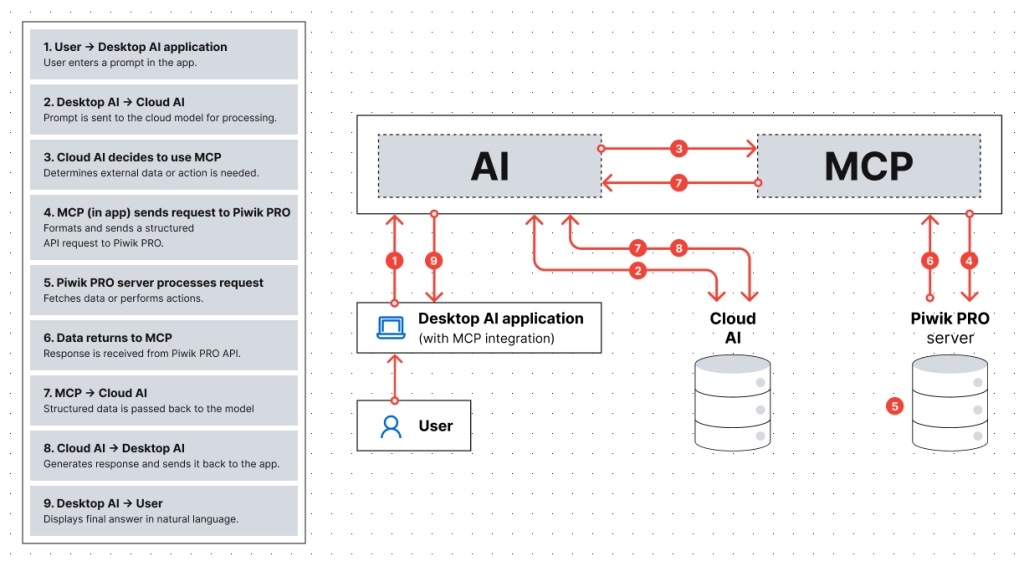
Once that connection is set up, you type a request – “show me conversions by channel for European traffic in March, compared to February” – and the AI retrieves real data from your Piwik PRO account and returns it as a structured, ready-to-use result.
Who benefits most for implementing an MCP server into marketing workflows
MCP is useful across the whole marketing team, but it changes the day-to-day most for a few specific roles.
If you’re a marketing manager or generalist who currently waits for someone else to pull a report, MCP removes that wait. You get the answer directly, without needing to learn the platform or ask someone on the analytics team.
If you run paid campaigns, MCP lets you combine ad spend data with Piwik PRO conversion data in a single step – no more exporting from two tools and reconciling in a spreadsheet.
If you’re an analyst, MCP fits the way you already work: ask a question, follow up, go deeper, try a different angle – all without rebuilding your view each time.
If you manage multiple properties – as an agency or enterprise team – MCP cuts the setup and maintenance work that normally happens one site at a time. In Piwik PRO, that includes not just analytics but also Tag Manager: tags, triggers, tracking configuration, and container publishing all live in the same platform. So when you’re managing ten sites, you’re managing all of that across ten sites. MCP lets you handle it through prompts instead of logging into each property manually.
What you can do with it
For everyday reporting: ask which campaigns performed best last month, which blog posts drove the most organic conversions, or why a metric dropped last week. You get a direct answer and can keep going – “break this down by device,” “show only new users,” “compare to the previous period.”
For more complex analysis: combine your Piwik PRO data with an uploaded spend file to get a complete cross-channel campaign view in one step. Calculate metrics that don’t exist natively in the platform – like cost per conversion or scroll depth medians – without custom scripts or manual work.
For setup and configuration: create properties, apply privacy settings, build tracking setups with tags, triggers, variables and goals, and audit existing implementations – all through the same kind of requests, across as many properties as you need.
“AI opens up opportunities every organization should explore. After working with Piwik PRO MCP Beta for months, I see it as an enhancer: it helps newcomers do more with data and senior professionals move faster.
Piwik PRO MCP Beta supports both data work and implementation — from fetching dashboards and creating slide-ready insights to setting up data collection, adding tags, and scaling the setup.
Does that make the UI obsolete? Definitely not. Clicking is still faster in many cases. MCP simply removes friction, especially around repetitive work.”

Michał Idziak
Product Evangelist, Piwik PRO
Want to go deeper on MCP?
Find use cases, prompt examples, security considerations, and a full setup walkthrough in our complete guide. For technical reference and configuration details, the help center documentation has you covered.
How to get access to Piwik PRO MCP Beta
Piwik PRO MCP is in Beta and open to early adopters. If you’re comfortable testing features that are still evolving, we’d love to have you try it out and share feedback. The Piwik PRO MCP Beta configuration guide has everything you need to get started.
Need help getting your MCP up and running?
MCP is in Beta, so support capacity is limited and we prioritize requests based on account status. Tell us what’s going on and we’ll do our best to get back to you.
This is just the beginning. Our goal is to make your analytics data accessible to everyone on your team – not just the people who know the platform inside out. We think MCP is a meaningful step towards that, and we’re genuinely excited to see how teams put it to use.
Get answers from your analytics without the back-and-forth
With Piwik PRO and MCP Beta, anyone on your team can query data, manage tracking, and act on insights – in a single prompt, without switching tools. See it with your own data.