


Disclaimer: This blog post is not legal advice. Piwik PRO provides privacy-friendly analytics software, but does not provide legal consultancy. If you’d like to make sure you’re in compliance with HIPAA guidelines, we encourage you to consult an attorney.
Healthcare organizations have four main approaches to achieving HIPAA-compliant analytics. Each has different trade-offs in cost, technical complexity, and analytics capabilities.
This guide compares all four implementation methods – from using Google Analytics with workarounds to deploying fully HIPAA-compliant analytics platforms – so you can choose the right approach for your organization’s needs and resources.
We’ll show you what each approach requires, what it costs, where it falls short, and which healthcare organizations it works best for.
Understanding HHS guidance on tracking technologies
In December 2022, the US Department of Health and Human Services (HHS) Office for Civil Rights (OCR) issued guidance on online tracking technologies to HIPAA-covered entities. The bulletin clarifies how healthcare organizations must handle tracking technologies, such as analytics platforms, pixels, and cookies, when they collect protected health information (PHI).
What the guidance defines as tracking technology: Scripts or code on websites or mobile apps that gather information about users as they interact with digital properties. This includes:
- Cookies and tracking pixels
- Session replay scripts
- Analytics platforms
- Fingerprinting scripts
- Web beacons
What data becomes PHI in analytics: The guidance explains that identifiable health information is created when tracking technologies collect:
- IP addresses or geographic location
- Medical record numbers
- Email addresses or phone numbers
- Dates of appointments
- Medical device IDs
- Any unique identifying codes
Combined with health-related interactions (visiting pages about specific conditions, scheduling appointments, accessing patient portals), this identifiable information becomes PHI subject to HIPAA.
The critical distinction: Authenticated vs. unauthenticated pages
- Authenticated pages (requiring login) almost always contain PHI when tracked – including patient portals, appointment scheduling, billing pages, and health record access.
- Unauthenticated pages (public pages) may or may not create PHI, depending on the visitor’s intent and page content.
The March 2024 update to the guidance clarified that simply visiting a healthcare provider’s public webpage (like visiting hours or job postings) doesn’t automatically create PHI unless the visit relates to an individual’s past, present, or future health, healthcare, or payment for healthcare.

For detailed PHI definitions and the latest regulatory updates, see our PHI and PII compliance guide.
When analytics creates PHI: Practical examples
The HHS guidance provides specific scenarios to help organizations understand when tracking creates PHI:
Situations where PHI is NOT disclosed:
- Collecting IP addresses from visitors viewing job postings or general visiting hours pages
- Tracking a student who visited an oncology services page for academic research (not related to their own health)
- General blog posts about health topics where visitor intent isn’t health-seeking
Situations where PHI IS disclosed:
- Tracking the IP address of someone visiting the same oncology page to seek a second opinion on their diagnosis
- Collecting email addresses from appointment scheduling pages
- Tracking interactions with symptom checker tools
- Mobile app data, including device ID, geolocation, and health tracking information (like glucose levels in a diabetes management app
The intent problem: The guidance suggests organizations should consider visitor intent when determining if information is PHI. However, it doesn’t explain how to determine intent – and in practice, you can’t know if someone visiting a cardiology page is:
- Researching for a school project (not PHI)
- Seeking care for themselves (PHI)
- Looking for information for a family member (potentially PHI)
Practical implication: Since you cannot reliably determine visitor intent, the safest approach is to treat all tracking on health-related pages as potentially creating PHI and implement appropriate safeguards.
Important legal update: AHA lawsuit and current status
In November 2023, the American Hospital Association (AHA) sued HHS, challenging the OCR’s interpretation of HIPAA, particularly regarding the broad definition of PHI on unauthenticated pages. In June 2024, a US district court ruled in favor of the AHA, and in August 2024, HHS decided not to appeal.
What this means for healthcare organizations:
The court ruling was narrow in scope – it found that an IP address combined with visit data from an unauthenticated webpage does not automatically constitute PHI. However:
- The ruling does not vacate the guidance on authenticated pages (patient portals, appointment scheduling, and others)
- Healthcare organizations still face class-action lawsuits for tracking pixel violations
- Over $100 million in fines have been issued since 2023 for HIPAA violations related to tracking technologies
- OCR continues enforcement on authenticated pages and clear PHI disclosures
Bottom line: While the ruling provides some relief for public marketing pages, the fundamental compliance obligations remain. Organizations tracking health-related interactions still need appropriate safeguards, BAAs with vendors, and careful handling of PHI. Popular analytics platforms, such as Adobe Analytics and Google Analytics 4, should not be used by healthcare providers. Instead, they should seek out alternative solutions that prioritize data privacy and security.
For a complete analysis of the ruling’s implications: The AHA’s lawsuit against HHS guidance on online tracking technologies
Core HIPAA requirements for analytics according to HHS’s guidance
Based on the HHS guidance, HIPAA-covered entities must:
1. Sign business associate agreements (BAAs)
Before any PHI is passed to a tracking technology vendor, you must have a signed BAA in place. If a vendor won’t sign a BAA (like Google Analytics), you cannot share PHI with them.
2. Disclose tracking technology use
Your privacy policy, terms and conditions, and consent forms must disclose that you use tracking technologies. However, disclosure alone doesn’t make PHI sharing permissible – you still need a BAA.
3. Limit PHI sharing to the minimum necessary
Only share the minimum PHI required for your intended analytics purpose. Don’t collect visitor-level health data if aggregated metrics would suffice.
4. Implement technical safeguards
- Encryption for ePHI in transit (SSL/TLS) and at rest (AES-256)
- Access controls limiting who can view PHI
- Audit logs that track all PHI access
- Authentication requirements for sensitive data
5. Establish breach notification procedures
Have processes in place to notify affected individuals, HHS, and media (when applicable) if PHI is improperly disclosed to a tracking technology vendor.
Before choosing an implementation approach, ensure you understand the six core HIPAA requirements for analytics: BAA signing, encryption, access controls, audit logs, breach notification, and minimum necessary data collection.
Download our complete HIPAA compliance checklist.
How to make your analytics HIPAA-compliant
Analytics platforms differ in their approaches to HIPAA compliance and some are more optimal than others. Below, we list the most popular implementation options for HIPAA-covered entities and explain their pros and cons.
Approach 1: Google Analytics 4 with de-identification
Setup: Strip PHI before data reaches GA4 using server-side tag management or a CDP
Why it doesn’t work:
- Google won’t sign a BAA
- De-identified data loses personalization value
- High technical complexity and ongoing maintenance
- Configuration errors expose you to direct violations of HIPAA and Google Analytics’ Terms of Service
Verdict: Not recommended. See our full analysis: Is Google Analytics HIPAA-compliant?
Approach 2: Multi-tool stack with a privacy layer
Setup: Use a platform (Freshpaint, Segment, Tealium) as middleware between your site and other systems, such as analytics tools. The platform signs a BAA, takes in and cleans data, de-identifies PHI, and controls data flow to non-compliant destinations.
Best for: Large organizations that have heavily invested in existing tools (GA4, Adobe Analytics) and want to maintain those while adding compliance.
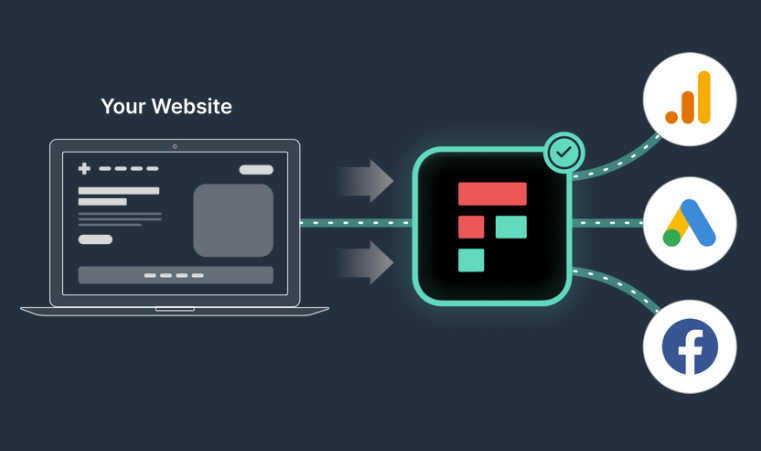
Trade-offs:
- High cost: You need to license and implement multiple vendors.
- Complex setup: Requires data engineering expertise to integrate other tools needed to complete the setup (such as a data warehouse, a data visualization tool, or an analytics platform).
- Limited analytics capabilities: No native analytics, you can’t report on or visualize the data within the platform.
- Limited insights: No access to PHI, de-identified data restricts personalization, customer journey analysis and visitor stitching; you will end up working on an incomplete dataset.
- Ongoing maintenance: API changes break integrations, you need resources and coordination across multiple tools to maintain the setup.
For a detailed comparison of HIPAA-compliant tools, see: Review of HIPAA-compliant analytics platforms
Approach 3: Self-hosted analytics
Setup: Choose on-premises analytics (Matomo, Snowplow, Piwik PRO’s private cloud – dedicated database). Since the vendor never accesses your data, no BAA is needed.
Best for: Large hospital systems with dedicated IT teams and regulatory requirements for complete data control
Trade-offs:
- Very high cost: Including ongoing infrastructure costs
- Resource-intensive: Requires dedicated DevOps, security, and maintenance
- Scaling challenges: Hardware upgrades needed as traffic grows
Approach 4: HIPAA-compliant analytics platform
Setup: Use a purpose-built HIPAA-compliant platform (Piwik PRO, Mixpanel, Amplitude, Heap) that signs a BAA and provides built-in compliance features
Best for: Most healthcare organizations – from mid-sized practices to large health systems
Key benefits:
- Collect and analyze PHI without de-identification
- Full analytics capabilities (personalization, segmentation, journey tracking)
- Built-in security: encryption, access controls, audit logs, HIPAA-compliant hosting
- Fast implementation
- Lower total cost of ownership
Trade-offs:
- Requires migration from existing tools
- Single-vendor dependency
For feature-by-feature comparison of these platforms: Compare 9 HIPAA-compliant analytics platforms
Choosing your implementation approach: Decision framework
Start here: Answer these 3 questions
Find the right healthcare analytics implementation approach for your organization based on your requirements and available resources.
1. Can your analytics vendor sign a business associate agreement (BAA)?
- Yes → Proceed to question 2
- No → You must either switch vendors OR implement a privacy layer (Approach 2)
2. Do you need to collect and analyze PHI for personalization?
- Yes → Use Approach 4 (HIPAA-compliant platform)
- No → Consider Approach 1 (de-identification) only if you have deep technical expertise
3. What are your technical resources and budget?
- Limited (<2 technical staff, <$10K/month budget) → Approach 4 (all-in-one platform)
- Moderate (small IT team, $10K-30K/month budget) → Approach 2 (multi-tool stack) or Approach 4
- Extensive (dedicated IT team, $50K+ budget) → Approach 3 (on-premises) or Approach 4
When each healthcare analytics approach won’t work
Don’t choose Approach 1 (GA4 de-identification) if:
- You need visitor-level insights or personalization
- You lack senior developers to maintain complex configurations
- Your legal team hasn’t approved the risk exposure
Don’t choose Approach 2 (Multi-tool stack) if:
- You’re a small-to-mid-size organization (<$50M revenue)
- You need a quick implementation (under 3 months)
- De-identified data would eliminate your key use cases
Don’t choose Approach 3 (On-premises) if:
- You lack a dedicated DevOps/infrastructure team
- You need to scale traffic quickly (seasonal campaigns)
- Your focus is on analytics insights, not infrastructure management
Don’t choose Approach 4 (Purpose-built platform) if:
- You’re a large enterprise deeply integrated with the Adobe or Google ecosystem
- Note: Approach 4 is the safest default option for most healthcare organizations.
Phase-by-phase: HIPAA-compliant analytics platform implementation
Week 1-2: Planning & setup
- Sign the BAA with the vendor
- Configure hosting and choose a data center location
- Set up user roles and access controls
- Map your current tracking to the new platform
Week 2-3: Implementation
- Install the tracking code
- Configure events and conversions
- Set up custom reports and dashboards
- Integrate your analytics with existing tools (CRM, EHR, marketing automation)
Week 3-4: Testing & launch
- Run your new HIPAA-compliant platform in parallel with the old system (if applicable)
- Validate data accuracy
- Train team members
- Document compliance procedures
Post-launch: Ongoing (minimal)
- Annually: Renew BAA
- Monthly: Review access logs
- Quarterly: Conduct compliance audits
Your next steps
Most healthcare organizations find that Approach 4 – a purpose-built HIPAA-compliant platform – offers the best balance of compliance, capabilities, and cost. But the right choice depends on your specific situation.
Unsure which approach fits your needs?
- Download our HIPAA compliance assessment → Takes 10 minutes and helps identify your gaps
- See our 9-platform comparison → Compare detailed analytics vendor features
- Talk to us → Reach out to us with any questions you may have about HIPAA and analytics
The healthcare organizations that succeed with HIPAA-compliant analytics don’t overthink it – they choose a compliant platform, implement it quickly, and get back to focusing on patient care.
If you’ve decided that a HIPAA-compliant analytics platform is the option for you, see Piwik PRO in action
Any questions about HIPAA compliance? Reach out to us and tell us how we can help
Frequently Asked Questions
What are the 4 main ways to make analytics HIPAA-compliant?
Healthcare organizations have four approaches:
- Google Analytics with de-identification
- Multi-tool stack with a privacy CDP like Freshpaint
- Self-hosted analytics platforms
- Purpose-built HIPAA-compliant platforms like Piwik PRO or Mixpanel
Most organizations find approach 4 offers the best balance of compliance, capabilities, and cost.
Can I make Google Analytics 4 HIPAA-compliant?
No. Google won’t sign a business associate agreement (BAA) and explicitly prohibits HIPAA-covered entities from using GA4 with PHI. While you can strip PHI before sending data to GA4, this violates Google’s Terms of Service and eliminates valuable personalization insights.
What is a business associate agreement (BAA), and why do I need one for analytics?
A BAA is a HIPAA-required contract with any vendor that handles PHI on your behalf. You need one with analytics platforms that collect visitor data containing PHI, like IP addresses, combined with health-related page visits. Without a BAA, sharing PHI violates HIPAA and can result in fines up to $63,973 per violation. Read more: HIPAA violations and fines: What healthcare organizations need to know.
What happens to PHI if I accidentally send it to a non-compliant analytics platform?
You must notify all affected individuals and report to HHS within 60 days. Penalties range from $137 to $63,973 per violation with annual caps up to $2 million. You also face potential class-action lawsuits and significant reputation damage.
Do I need to de-identify PHI before using analytics platforms?
It depends on your vendor. Purpose-built HIPAA-compliant platforms that sign a BAA allow you to collect and analyze PHI without de-identification. Non-compliant platforms like Google Analytics require de-identification using Safe Harbor or Expert Determination methods, which eliminates personalization capabilities.
What technical safeguards are required for HIPAA-compliant analytics?
Required safeguards include AES-256 encryption for data at rest, TLS 1.2+ encryption in transit, role-based access controls, comprehensive audit logs, authentication requirements, and automatic session timeouts. Your analytics vendor should provide these built in.
Can I use server-side Google Tag Manager for HIPAA compliance?
Server-side GTM helps control data flow but doesn’t make Google Analytics HIPAA-compliant. Google still won’t sign a BAA for GA4, de-identification removes valuable insights, and configuration errors risk violations. It works better as part of a multi-tool stack with a HIPAA-compliant CDP.
Which healthcare organizations need HIPAA-compliant analytics?
All HIPAA-covered entities collecting PHI need compliant analytics, including hospitals, medical practices, health insurance companies, telehealth platforms, mental health providers, pharmacies, medical device manufacturers, and healthcare SaaS companies. Even public marketing pages create PHI when visitors interact with health-related content.
What’s the difference between a HIPAA-compliant analytics platform and a customer data platform (CDP)?
Analytics platforms collect, analyze, and report on user behavior. CDPs unify data from multiple sources to create complete patient profiles. Some platforms, like Piwik PRO, offer analytics and CDP capabilities in one platform.* Any tool that accesses PHI – such as analytics, CDP, or tag manager – must sign a BAA and provide HIPAA-specific security features.
* Piwik PRO’s CDP is now called Data Activation.
How do I choose between self-hosted and cloud-hosted HIPAA-compliant analytics?
Choose self-hosted if you’re a large hospital with dedicated IT teams and have a significant budget. Choose cloud-hosted if you’re a small-to-mid-size organization needing faster implementation, lower costs, and less infrastructure management. Cloud platforms with HIPAA-compliant data centers and signed BAAs provide equivalent security.